Free Digital Photo Converter for Novices and Professionals

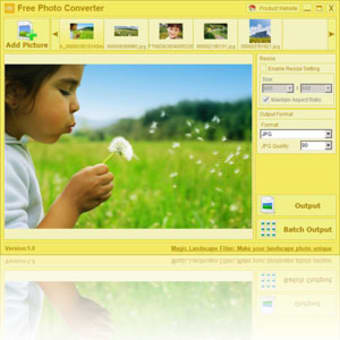
If you have been looking for an alternative to memory-intensive image editing software such as Adobe Photoshop or GIMP this free photo converter is definitely worth a closer look. Within a few clicks you will be able to modify an existing photo into a number of different formats while it can also be resized to suit your unique options. This entire package is less than one megabyte so it is perfect if you desire a no-frills image editor.

Top Recommended Alternative

Streamlined Functions and Features

This free photo converter offers a handful of interesting benefits. You will be able to output an existing file into JPG BMP GIF PNG and TIFF formats. This is useful for compression requirements or if you plan on uploading the image onto a different operating system. If you have more than one photo you can use a batch function that converts multiple files. You can also resize photos to fit various dimensions. This is important for embedding images within an existing text or when meeting the requirements of a specific web page. This software is absolutely free and unlike more complicated systems it is easy to use and requires no previous knowledge of image editing.


  • Pros

    • This free photo converter will take up little memory.
    • The interface is quick and simple to use.
    • Multiple output formats provide a unique sense of flexibility.
  • Cons

    • The are no image editing options such as adjusting contrast levels or colour balance.
    • Does not support all image file formats.
 0/1

App specs

  • License

    Free

  • Version

    1.1

  • Latest update

  • Platform

    Windows

  • OS

    Windows ME

  • Language

    English

  • Downloads

    152.2K

    Last month's downloads

    • 89
  • Size

    1.04 MB

  • Developer

Program available in other languages


User reviews about Free Photo Converter

Have you tried Free Photo Converter? Be the first to leave your opinion!

Add review

You may also like

Alternatives to Free Photo Converter

Explore Apps

Latest articles

Laws concerning the use of this software vary from country to country. We do not encourage or condone the use of this program if it is in violation of these laws.
Softonic

Is Free Photo Converter safe?

96/100

Score result: Clean

This file passed a comprehensive security scan using VirusTotal technology. It is safe to download.

  • Virus free
  • Spyware free
  • Malware free
  • Verified by Security Partners

    VirusTotal logo

Scan Info

Last scan
Thursday, November 9, 2023
Scan provider
VirusTotal · Full report

File Integrity

File
FPC_setup.exe
SHA256
69f215ec683a03f24d0ca3175fc9e67947d00a2725fe6a8d1cb11f202801599b
SHA1
0d5ba52749f2ec785b3d14f307d9fe706800d99b

Softonic security commitment

Free Photo Converter has been thoroughly scanned by our advanced security systems and verified by industry-leading partners. This file comes from the official developer and has passed all our security checks, showing no signs of viruses, malware, or spyware. For more information, visit our Security and Trust Center